| www.qtsoftware.de |
| ForDBC |
| Access Databases and Spreadsheets in Fortran on a PC under Windows |
With ForDBC the Fortran programmer can read and write tables of databases using common SQL commands.
ForDBC is based on the ODBC API (ODBC=Open Database Connectivity Standard) which is part of the Microsoft Windows System. And so, any database which comes with an ODBC driver becomes accessible in your Fortran program. This is the case for databases of manufactures such as Oracle, Microsoft, IBM, Sybase, MySQL. And this is also true for spreadsheets created with Excel or Lotus.
On Windows an ODBC interface is ready for usage by C/C++ programmers. However the ODBC functions are not easy to access by a Fortran programmer because the documentation and the tools supplied by Microsoft are designed for C/C++ or VB programmers. ForDBC offers help. The Fortran interface provided by ForDBC is complete with respect to the ODBC v3.5 specification. This means that with ForDBC you can call all of these ODBC functions as if they were programmed in Fortran. Furthermore hundredths of ODBC and SQL specific constants are supplied. Simply include in your Fortran program the source line
USE ForDBC
and you are ready to use the ODBC functions and constants as you find them documented in the Windows ODBC API. This documentation either comes with your compiler (e.g., Intel Visual Fortran, or Compaq Visual Fortran, or Microsoft Visual Studio) or it can be found in the Microsoft Windows Platform Software Development Kit (SDK) which is supplied with most software development tools offered by Microsoft. Or you find it on Microsoft's Developer WebSite. Because getting started with ODBC can be time-consuming, ForDBC is equipped with several example programs (completely in Fortran) which show you how to use ODBC. They demonstrate how to read from or write to database tables. They provide a common Microsoft Access database (.mdb) or an Excel spreadsheet (.xls) for demonstration, so you don't have to worry about setting up a SQL database in the beginning.
ForDBC comes with a compact documentation
(PDF) which provides you with the essential information that you need
for a quick start into ODBC programming.
Users of Compaq Visual Fortran and Intel Visual Fortran
are supplied with a complete workspace (.dsw) and solution (.sln), respectively,
which contains several sample projects which show how to access a database
in several ways. So, a simple "Build" creates all the examples
from scratch. And you are ready to debug them to understand how they work.
For users of Intel Visual Fortran (v11.1 and higher) both 32-bit and 64-bit
versions are available.
Trial Version
If you want to test ForDBC, download
the ForDBC demo (ForDBC_326.zip, approx. 15.3 MB) and send
us an email to obtain the password for unpacking the .zip-file.
The ForDBC demo contains the complete ForDBC installation for Intel Visual
Fortran. When purchasing ForDBC, you will receive a licence file (by email),
which allows ForDBC applications (.exe) to be created without the restrictions
the ForDBC demo implies.
For a quick start you will find links to a few videos-tutorials below.
Prices & Licensing
For the other compilers, we deliver a single user licence
and the software including the documentation by email. You can use ForDBC
in your programs (.exe) and distribute them without any royalty payments
or runtime fees.
Prices depend on the compiler you want to use ForDBC with. Please have
a look at our pricelist.
Due to little demand, we still deliver version 2 of ForDBC for Lahey Fortran.
For Compaq Visual Fortran the version v3.0 will be delivered.
To order, simply send a purchase order by email
or fax (+49(0)30/92900872). Payment is possible by credit card (VISA and
Mastercard/Eurocard are accepted) or by money transfer to our account.
Example
ForDBC provides you two simple data bases - an MS/Excel sheet (ODBCTest.xls) and an MS/Access database (test-db.mdb). The MS/Access database contains a table named "Tabelle1". Its structure and contents:
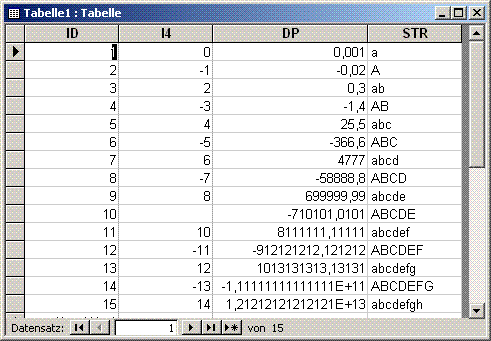
This table contains 4 columns named "ID", "I4",
"DP" and "STR". This example shall demonstrate how
to use the common Fortran variable types INTEGER, REAL. DOUBLE PRECISION
and CHARACTER.
To obtain all values of the table one would execute the SQL command:
SELECT id, i4, dp, str FROM tabelle1
((SQL = Structured Query Language). If you want to execute this command in a Fortran program, then you can do so calling an ODBC function which is made availabe via ForDBC:
 iRet = SQLExecDirect( hStmt, &
        "SELECT id, i4, dp, str FROM tabelle1"//CHAR(0), &
         SQL_NTSL )  ! the command string must be zero-terminated
This executes the SELECT command, but it does not deliver the table's contents. To get this in a Fortran program, the values in the table's rows have to be transferrred into associated Fortran variables ("bound variables"). We declare these Fortran variables (here in Fortran 77 notation)
INTEGER*2 Id
INTEGER*4 I4
DOUBLE PRECISION DP
CHARACTER Str*30
whose names are simply identical with those of the table's columns (for better understandance). These Fortran variables are bound to column specifications in the SQL command by calling the ODBC function SQLBindCol or SQLBindParameter, respectively. For example:
iRet = SQLBindColI2( hStmt, 1, &
           SQL_C_SSHORT, Id, 0, cbFixedId )
           ! SQLBindCol variant for INTEGER*2 argument (Id)
binds the first parameter ("id") of the SELECT command to the Fortran variable "Id" (INTEGER*2). If then the ODBC function
iRet = SQLFetch( hStmt )
is executed, the Fortran variable "Id" will hold the value which is found in the current row of the column labeled "id" in table "tabelle1". Internally SQLFetch uses a row cursor which is incremented each time SQLFetch is executed. This means, to get the whole result set of the SELECT command, SQLFetch is to be called repeatedly (in a loop).
A complete example program which demonstrates how the SELECT command above is programmed in Fortran can be found here (note: this still uses ForDBC v2, a previous version of ForDBC).
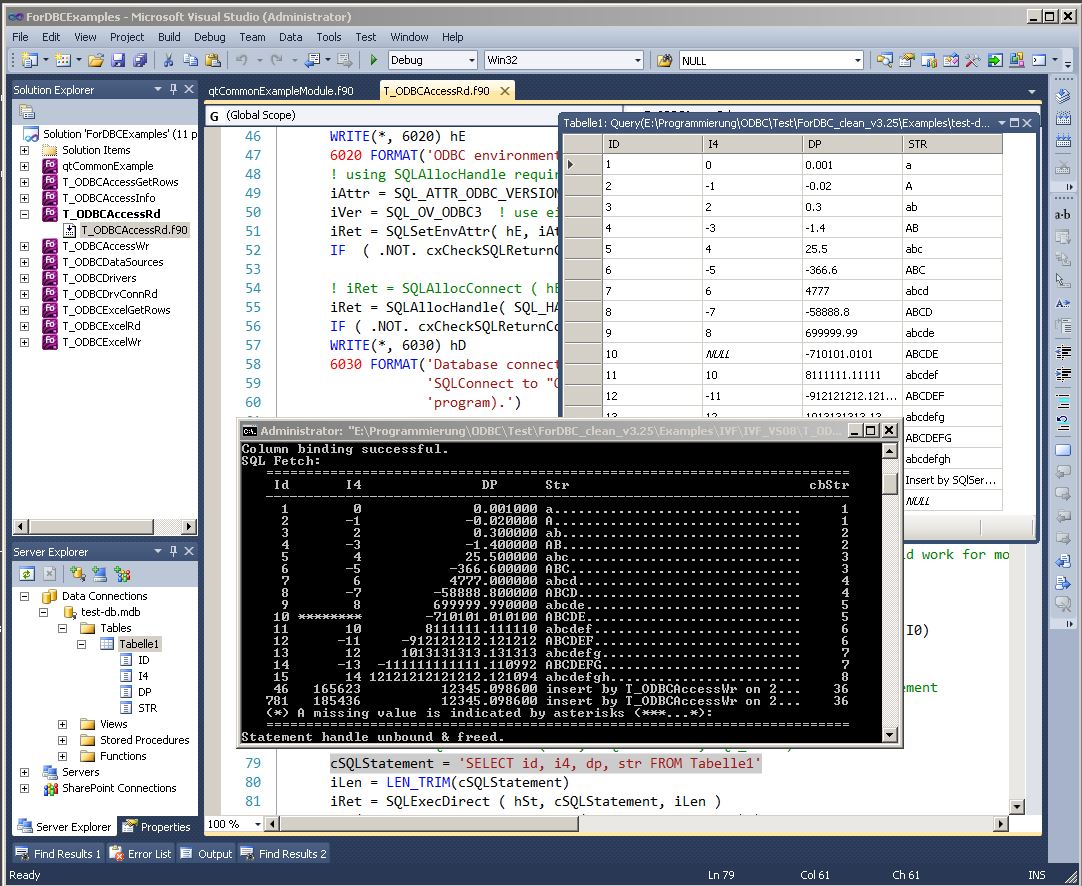
Illus.: ForDBC example program (T_ODBCAccessRd) in Visual Studio with Solution- & Server-Explorer
We provide Intel Visual Fortran users with several videos
that allow a quick start with ForDBC.
You can either download these .mp4 videos via a right-mouse-click on the
video title, or left-mouse-click on the title to start the video in your
browser. Under Windows these videos can be viewed in Windows Media Player,
for example.
| ForDBC Videos |
Size / Duration
|
| ForDBC
Installation The video shows the download of ForDBC and its subsequent installation, and describes the structure and its essential elements. Then the start of the MS/Visual Studio Solution is launched in VS2013 shows the automatic conversion of the VS2008 projects. |
25,7 MB
8:40 min |
| Introduction
into the Usage of ForDBC By means of ForDBC example Visual Studio projects the structure of the Intel Visual Fortran projects (.vfproj) and their essential compiler and linker properties are shown. After the "Build" of a ForDBC example program that program's process is shown in a debug run and the essential elements of an ODBC program are explained. |
139 MB 53:41 min |
| Creating
an ODBC Datasource Some ForDBC example programs use ODBC data source names (DSN). This video demonstrates how to define a DSN. |
49,1 MB 15:11 |
| Installation
of Microsoft ODBC Drivers For those who don't own MS/Excel or MS/Access but who nevertheless want to test the ForDBC examples, or those who want to access Excel files (.xls, .xlsx) or Access files (.mdb, .accdb) from within a Fortran program, here you will see from where to download the free ODBC drivers (Microsoft Data Access Components -MDAC for 32-Bit, and MS/Access Runtime Distributables for 64-Bit), and how to install them. |
16,7 MB 6:10 min |
| SQL
Error [ODBC Microsoft Access Driver]: Unable to open registry key
... If an access error due to unsufficient access rights (ACE) occurs when trying to connect to a MS/Access database, this video shows how to change the ODBC access rights in the Windows OS. |
8 MB 2:39 min |
Illus.: ForDBC example program (T_ODBCAccessRd) in Visual Studio with Solution- & Server-Explorer
Support, Training etc.
If you have questions regarding ForDBC, we would be happy to assist you. We also offer ForDBC trainings or develop ODBC based software, if you prefer to have the database access being programmed in Fortran by some external expert.
References - what customers say
J.N.: "I very rarely spend hard won research dollars
on a Fortran Commercial Product, except for Intel compiler, I bought the
NAG library a long time ago, but after trying two other ODBC connection
Fortran methods, I can actually say the FORDBC is solid and I am now
enjoying it." (quote from IVF
Forum)
Mike G, Australia 13.1.2015): "I think ForDBC is a first-rate
system – easy to use, intuitive, and very much better than Canaima’s F90SQL.
Thanks."

|
|
| Ordering | |
| · | Pricing |
| Training | |
| · | Access Database and Spreadsheets Fortran |
| Links | |
| · | ForDBC Evaluation for Intel Visual Fortran |
| · | ForDBC v3 Documentation (PDF) |
| · | ForDBC v2 Documentation (PDF) |
| · | qtXLS- Library for Import & Export of Excel Data |
| · | Microsoft Developer WebSite (MSDN Library) |
Delivery, Licensing, Requirements
| Article Id | FORDBC |
| Scope of delivery | via Download or by eMail: Software and Online-Documentation |
| Supported platforms | PC/Windows (98, NT4, ME, 2000, XP, 2003, Vista, 7, etc.) |
| System requirements | a few MB available on your harddisk, Windows (32-bit); Fortran 95 compilers (supported: Lahey LF95 v5.6 and higher, Compaq Visual Fortran 6.6, Intel Visual Fortran 11.x and higher, Salford FTN95 v4.x); SQL database (e.g., MySQL, MS/Access, MS/SQL, Oracle, Sybase SQL Anywhere, MySQL, or spreadsheet with ODBC driver (like Excel) |
| Manufacturer | QT software GmbH |
| Last revision date |
ForDBC v3.26, 26.8.2024, for Intel Visual Fortran v11.1 and higher
(supports both IFORT and IFX) |
| Licensing | single user |
| Runtime fees, royalties | none for applications which contain ForDBC in bound form (.exe) |
| Technical support | QT software GmbH |
| Demo available | |
| Last revision date of this document | January, 23rd, 2026 |

Notes regarding liability and copyrights, trademarks used on this page.